Puffy AI is live

Run your café by just asking.

Puffy is the AI assistant inside PufferPOS. Ask about today’s sales, your best sellers or what is running low, in Arabic or English, and get the answer from your real numbers in seconds.

Full access in the free trial. No card needed.

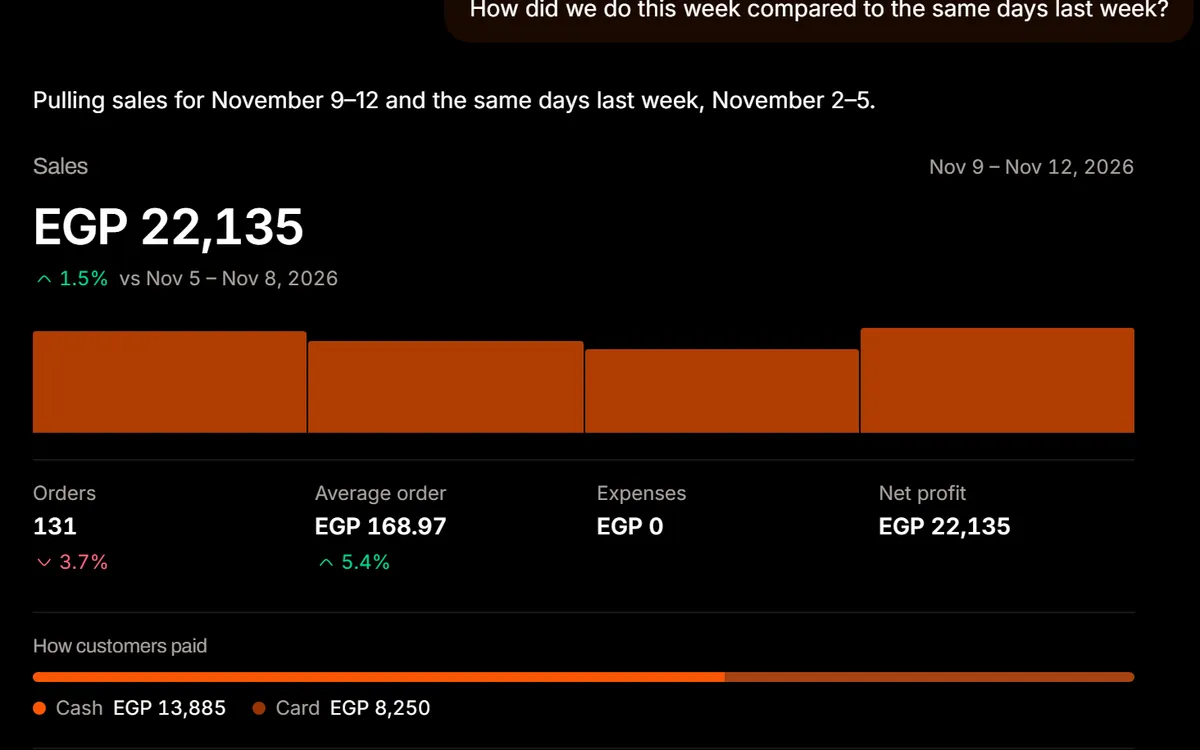
Puffy AI answering a weekly sales question with a chart of real café sales
Puffy AI on a phone, comparing this week’s sales with last week
  • How did we do this week compared to last week?
  • What are my top 5 items this month?
  • What sells least after 6 pm?
  • What’s running low in stock?
  • Log 850 EGP for milk from Juhayna
  • Who are my best customers this month?
  • Import this menu photo
  • Which hour is our busiest?
  • Takeaway: 2 cappuccinos and a croissant
  • How much cash came in on today’s shift?
WHAT PUFFY CAN DO

One assistant. Every corner of the business.

Puffy reads the same data your dashboard does, so you can skip the menus and just ask.

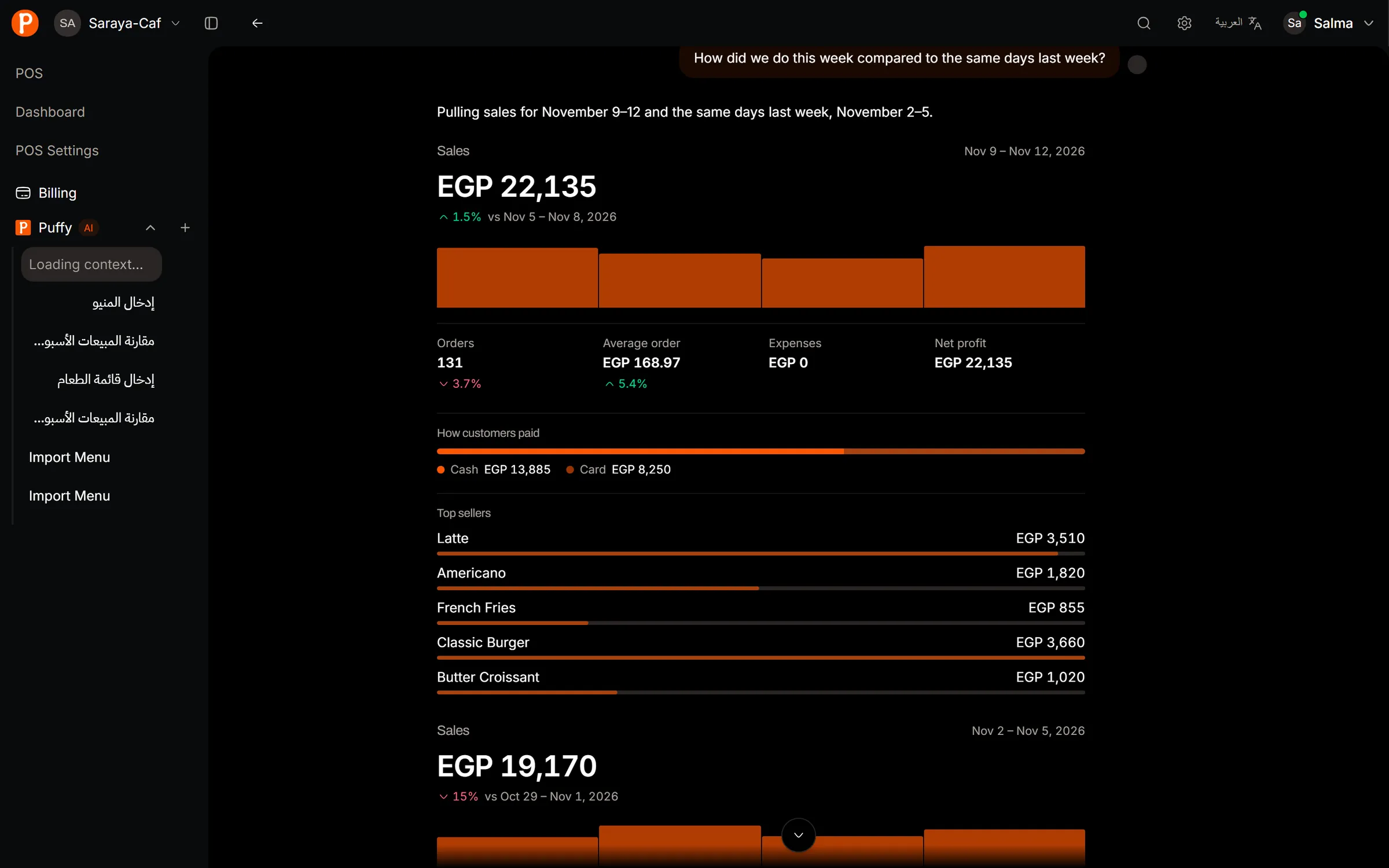
  • Sales in seconds

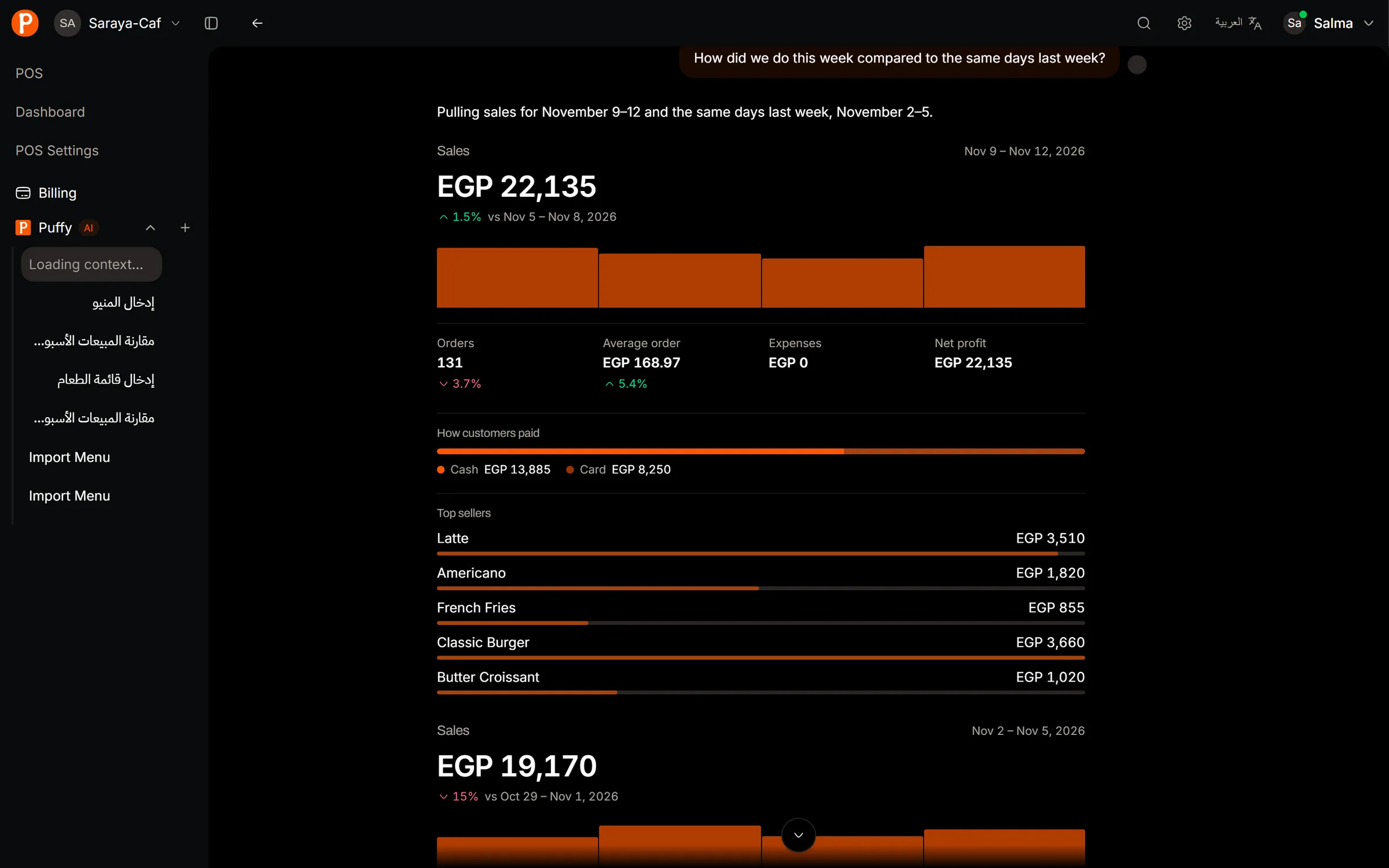
    Totals, payment mix, busiest hours and a fair comparison with the period before.

    How was this week?
    Sales in seconds: Totals, payment mix, busiest hours and a fair comparison with the period before.
  • Best and slowest sellers

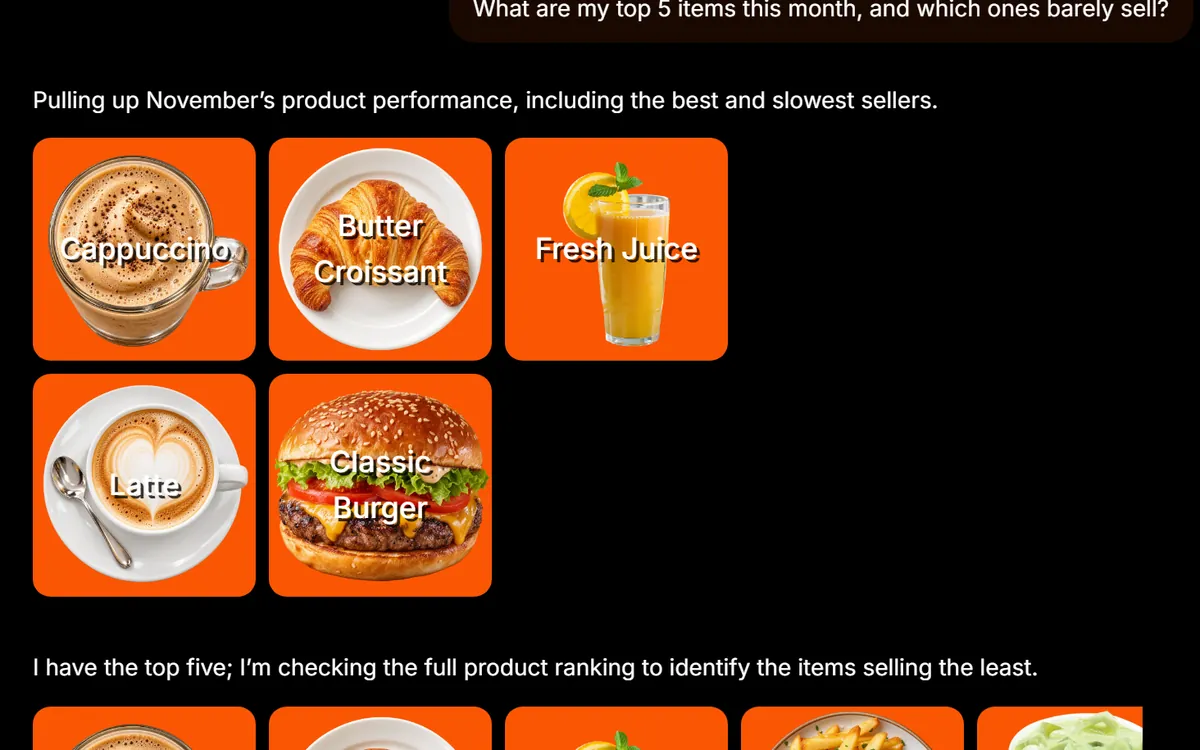
    Which items earn the most, which ones barely move, and when.

    Top items this month
    Best and slowest sellers: Which items earn the most, which ones barely move, and when.
  • Menu from a photo

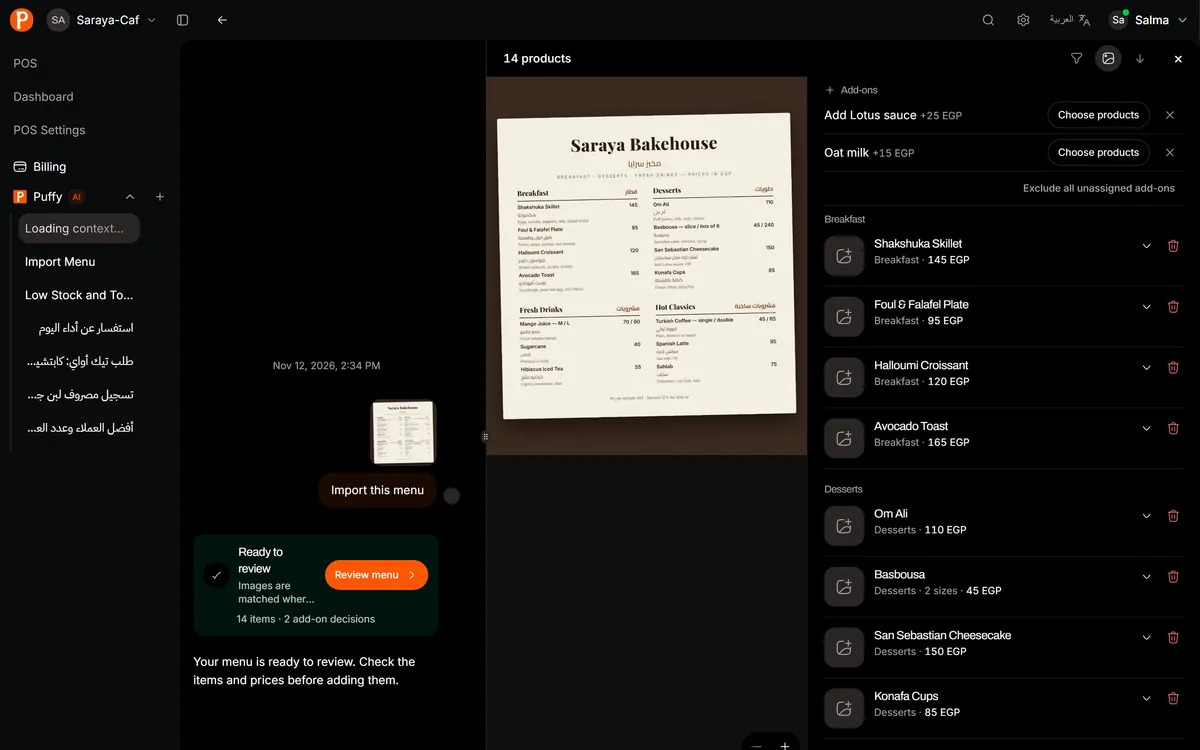
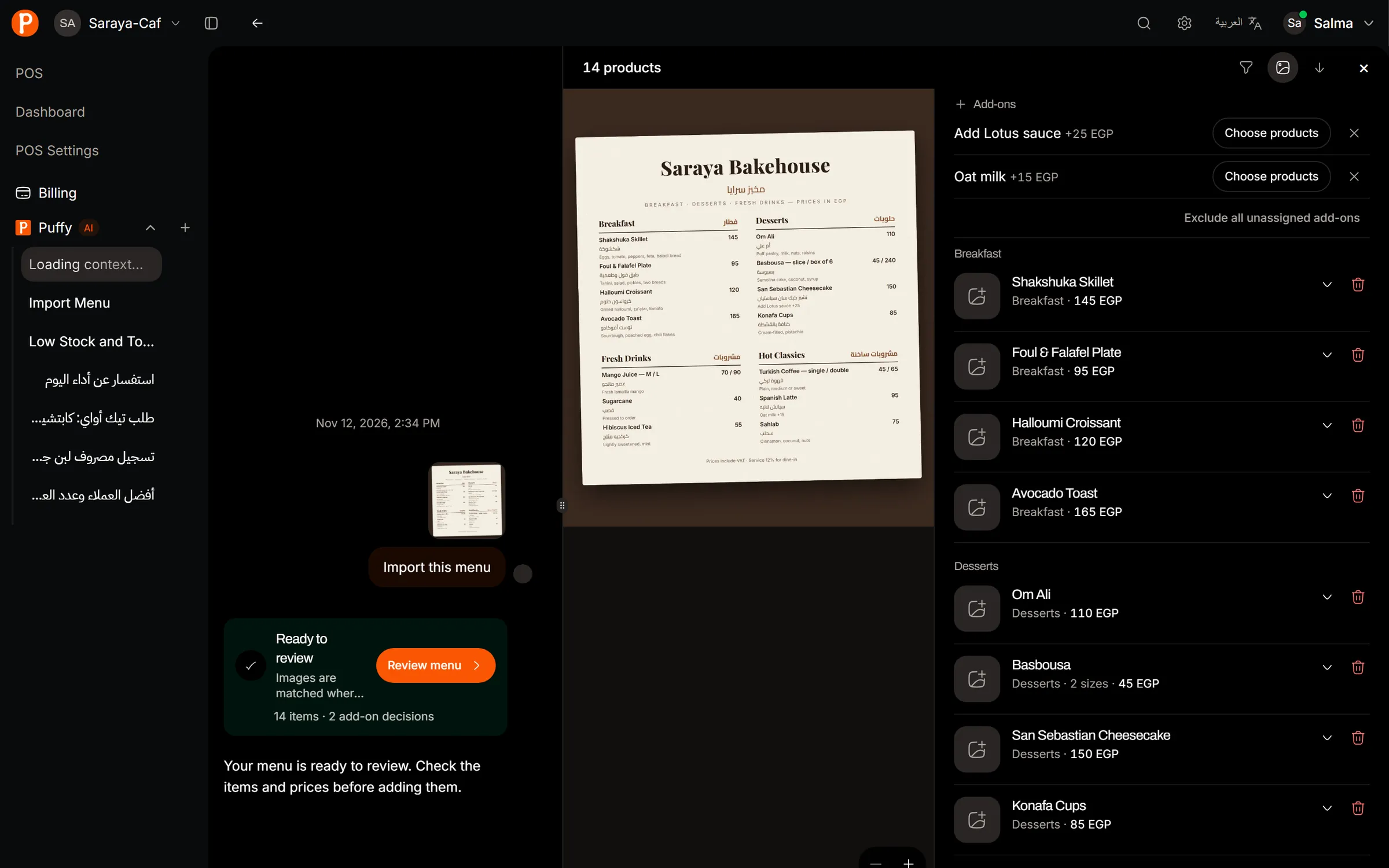
    Snap your printed menu. Puffy reads categories, items, sizes, add-ons and prices, and lays them next to the photo for you to check.

    Import this menu
    Menu from a photo: Snap your printed menu. Puffy reads categories, items, sizes, add-ons and prices, and lays them next to the photo for you to check.
  • Expenses by chat

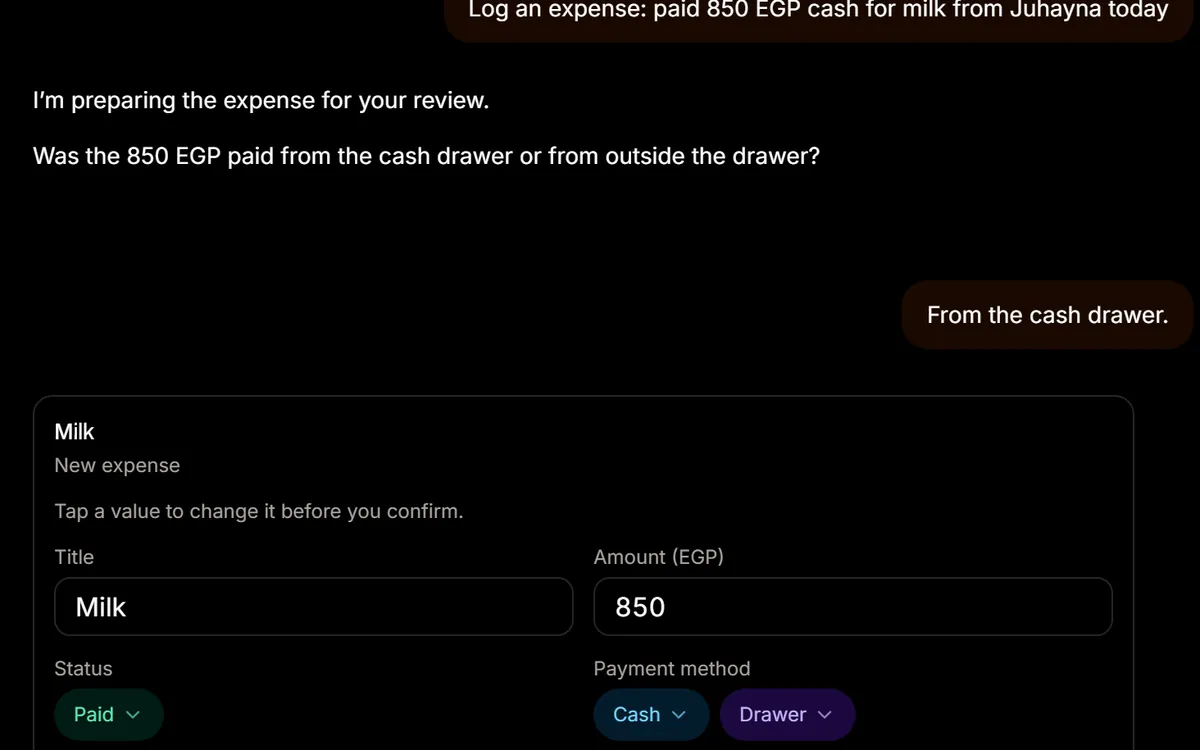
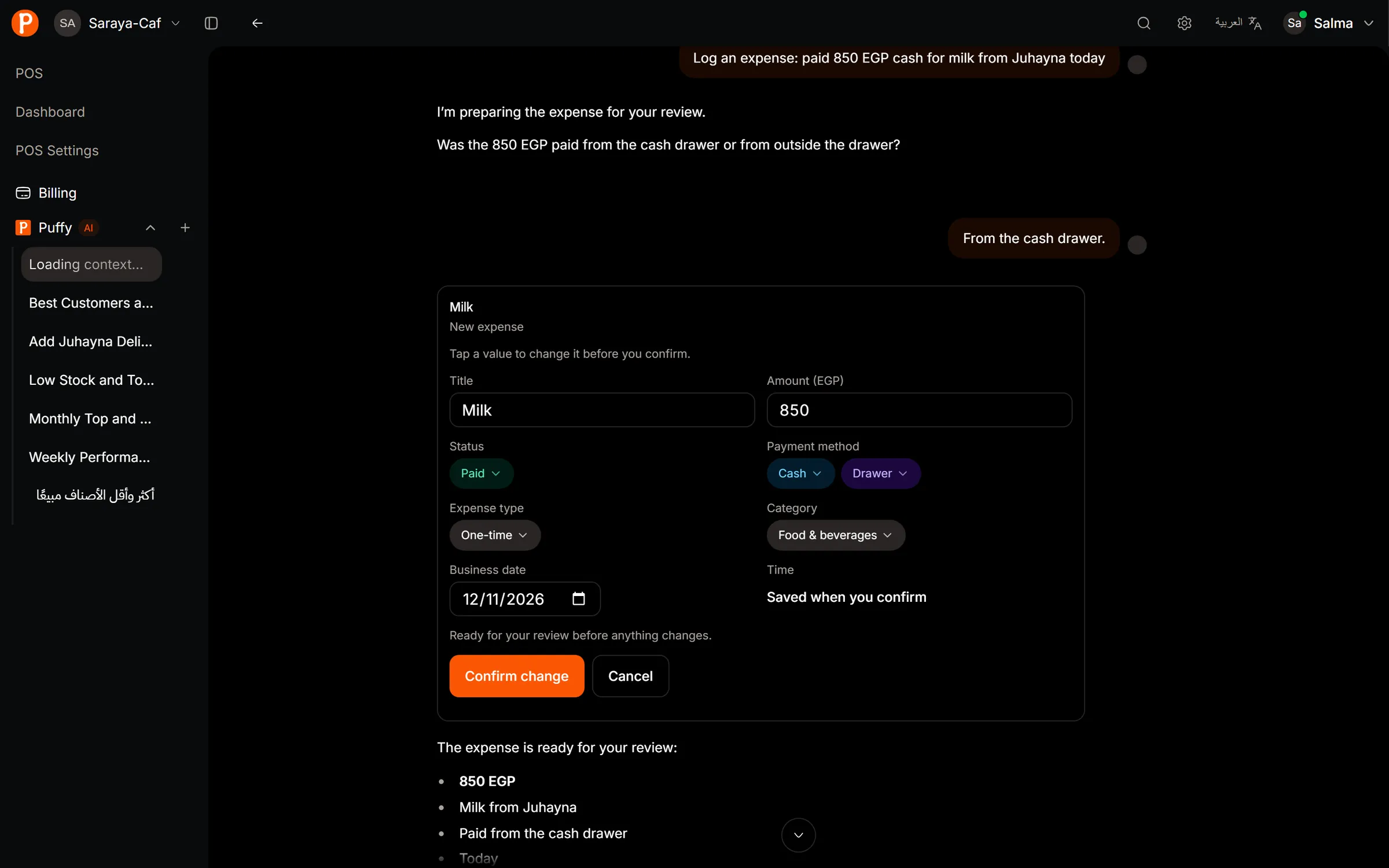
    Type the bill the way you would say it. Puffy fills the form, asks what it needs, and waits for you to confirm.

    Paid 850 for milk
    Expenses by chat: Type the bill the way you would say it. Puffy fills the form, asks what it needs, and waits for you to confirm.
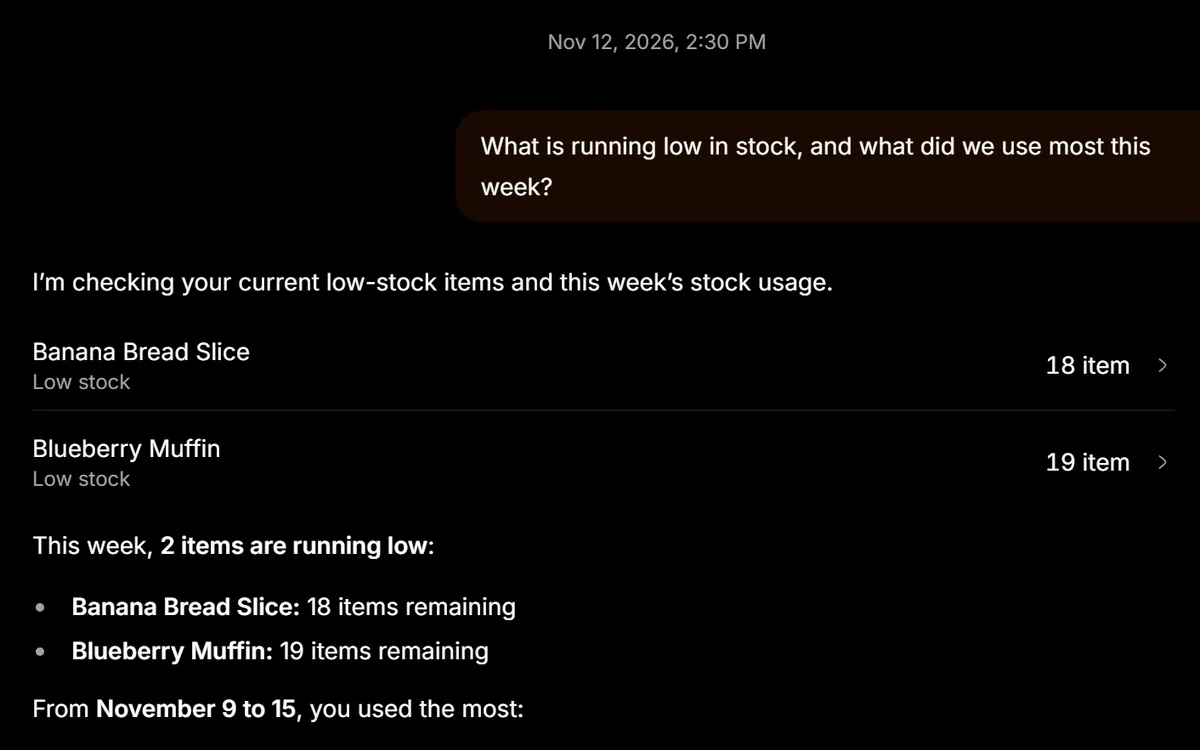
  • Stock that speaks up

    What is running low and what you used most this week, item by item.

    What’s running low?
    Stock that speaks up: What is running low and what you used most this week, item by item.
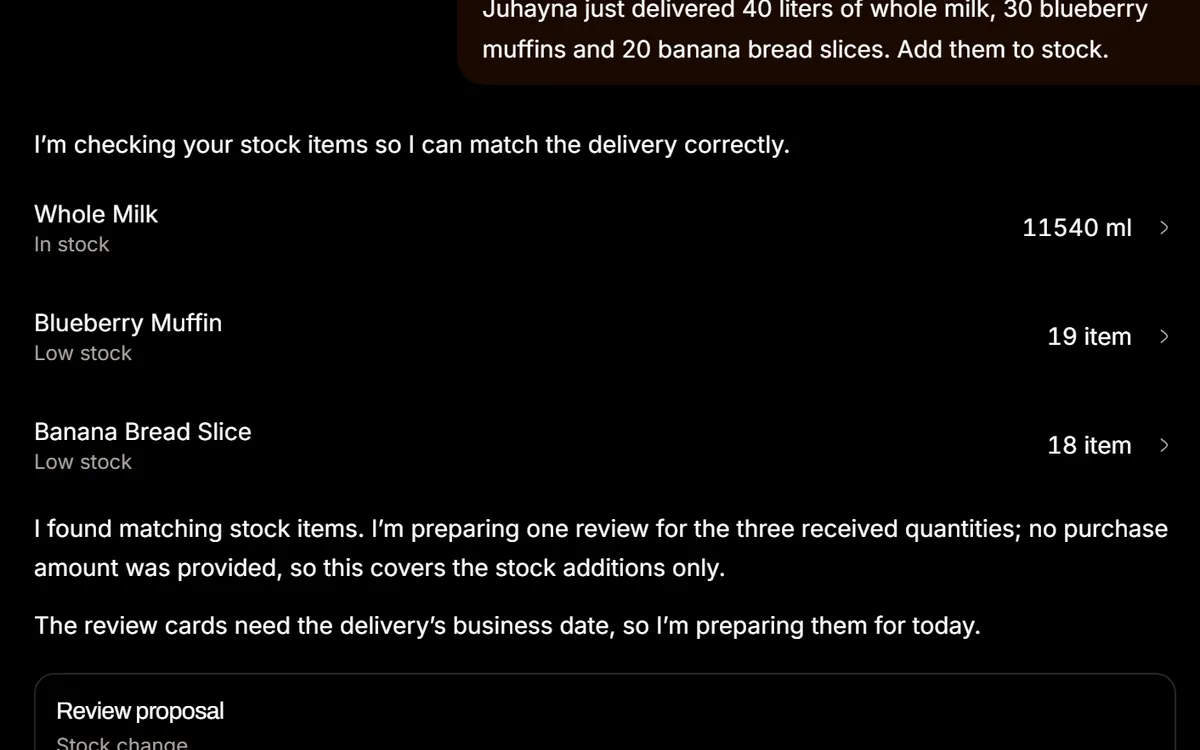
  • Deliveries by chat

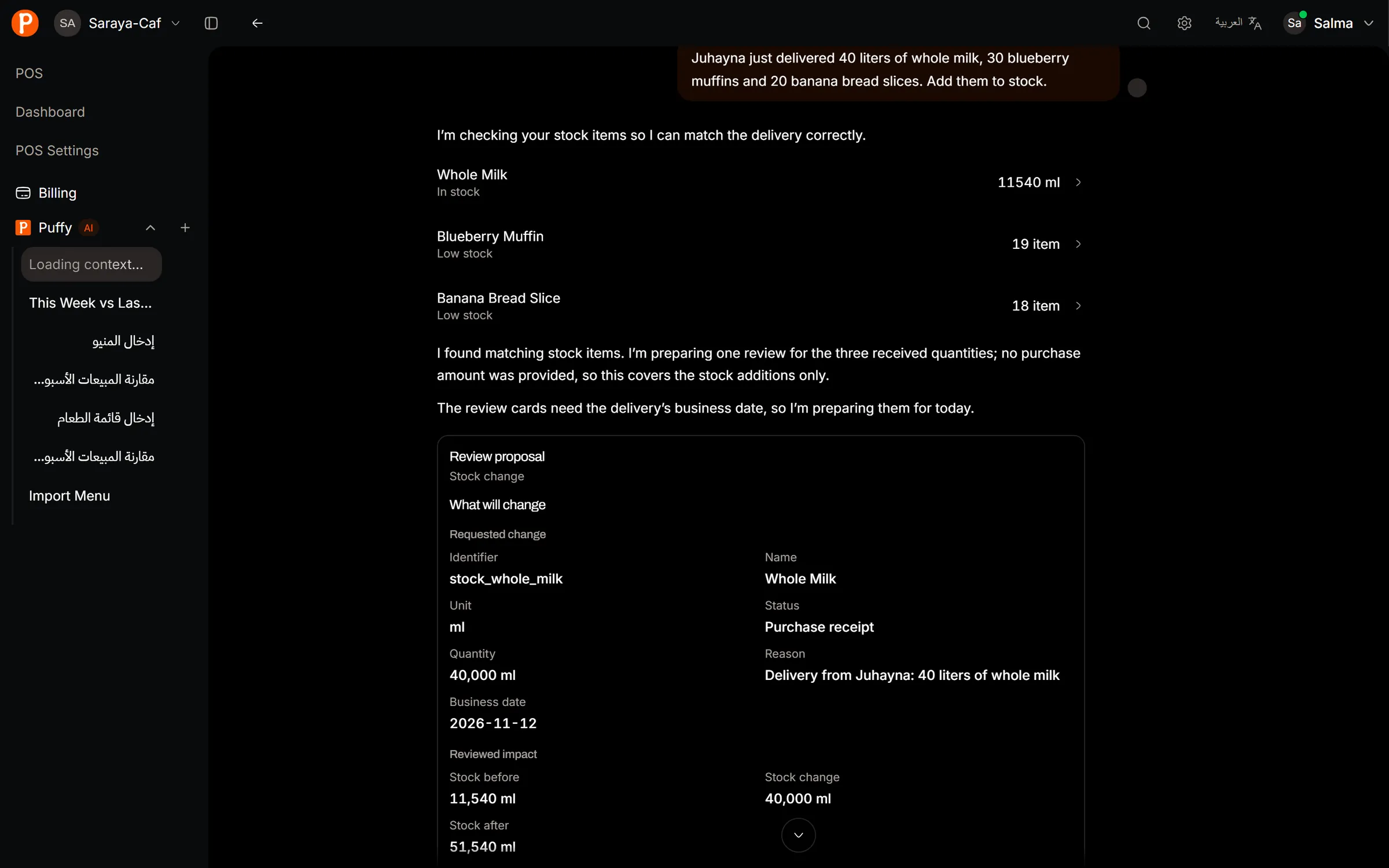
    Tell Puffy what the supplier dropped off. It shows the stock before and after each item.

    Juhayna delivered 40 L of milk
    Deliveries by chat: Tell Puffy what the supplier dropped off. It shows the stock before and after each item.
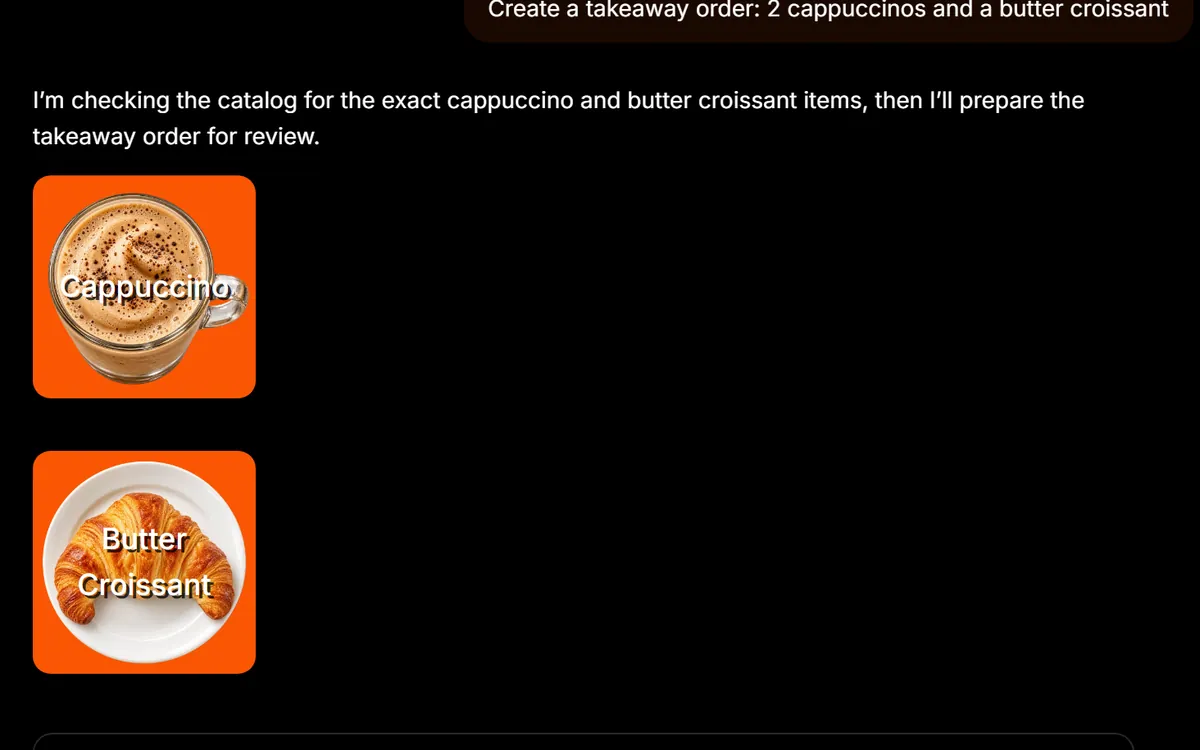
  • Quick orders by message

    Describe a simple order and Puffy matches items and prices from your menu, ready to confirm.

    2 cappuccinos, takeaway
    Quick orders by message: Describe a simple order and Puffy matches items and prices from your menu, ready to confirm.
HOW IT WORKS

Real workflows, not a demo trick.

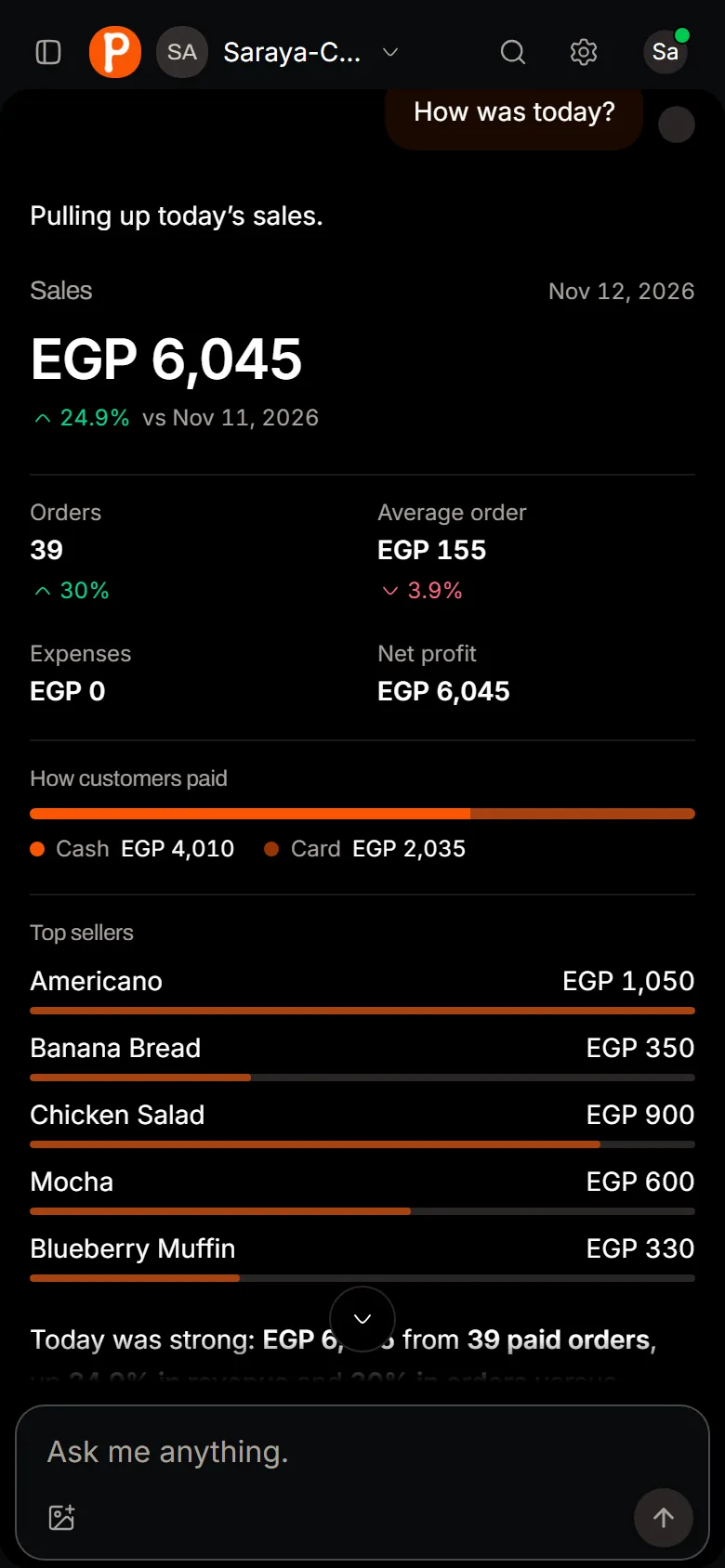
Every screenshot on this page is Puffy running on a café with six weeks of sales.

01

Ask about your numbers the way you’d ask your manager

Puffy picks the right period, reads your recorded sales and shows a report card you can scan in a few seconds.

  1. Open Puffy from the sidebar on any screen.
  2. Ask in your own words, in Arabic or English.
  3. Read the card: totals, trend, payment mix, best day and busiest hours.

Try asking“How did we do this week compared to the same days last week?”

Ask about your numbers the way you’d ask your manager. Puffy picks the right period, reads your recorded sales and shows a report card you can scan in a few seconds.
02

Turn a menu photo into a working menu

Attach one or more photos of your menu. Puffy reads them in the background, then hands you a clean review before anything is added.

  1. Attach photos of your menu in the chat.
  2. Ask Puffy to import it, and keep working while it reads.
  3. Check categories, prices and sizes, fix anything, then add them.

Try asking“Import this menu”

Turn a menu photo into a working menu. Attach one or more photos of your menu. Puffy reads them in the background, then hands you a clean review before anything is added.
03

Log the day’s paperwork by chat

Expenses, stock deliveries, cash in and out: describe it once and Puffy turns it into a filled form you confirm.

  1. Type what happened, like “paid 850 for milk from Juhayna”.
  2. Puffy prepares a review card with the amount, category and date.
  3. Check it and confirm. Only then is it saved.

Try asking“Log 850 EGP for milk from Juhayna today”

Log the day’s paperwork by chat. Expenses, stock deliveries, cash in and out: describe it once and Puffy turns it into a filled form you confirm.
04

Receive a delivery in one message

The supplier just dropped off milk and pastries? Tell Puffy what arrived. It matches each item to your stock list and shows the stock before and after.

  1. Type what arrived, like “40 liters of milk and 30 muffins from Juhayna”.
  2. Puffy prepares one review card per item, with stock before and after.
  3. Confirm each card. Stock updates right away for the whole team.

Try asking“Juhayna delivered 40 liters of whole milk and 30 muffins”

Receive a delivery in one message. The supplier just dropped off milk and pastries? Tell Puffy what arrived. It matches each item to your stock list and shows the stock before and after.
BUILT TO BE TRUSTED

Smart enough to help. Careful enough to trust.

An assistant that touches money has to be right. These rules are built into Puffy, not left to the model.

  • Numbers from your data

    Every total is read and calculated by our servers from your live records. Puffy never answers business facts from memory.

  • You confirm every change

    Products, expenses, stock and orders appear as review cards first. Nothing is written until someone confirms.

  • Respects roles

    Puffy can only see and do what the signed-in person is allowed to, the same as everywhere else in PufferPOS.

GET STARTED

Ask your first question in under two minutes.

  1. 01Start your free trial

    Create your space. Add your menu, or let Puffy import it from a photo.

  2. 02Open Puffy

    Find Puffy in the sidebar. It works on phones, tablets and computers.

  3. 03Just ask

    Start with “How was today?” and follow up the way you would with a person.

Included in Growth.

Puffy runs on AI credits. Simple questions use a few; reading a full menu uses more. You see your balance at any time.

Growth plan
3,000 credits / month
14-day free trial
100 credits
Extra credit packs
Available on Growth
Starter plan
No AI

Questions about Puffy

What is Puffy AI?

Puffy is the AI assistant built into PufferPOS. You ask it about your café or restaurant in plain Arabic or English, and it reads your real sales, orders, menu, stock, customers, expenses and shifts to answer. It can also prepare changes, like a new product, an expense or an order, for you to review and confirm.

Does Puffy make up numbers?

No. Every number comes from a tool that reads your organization’s live data and calculates totals on our servers, not from the model’s memory. When the data is not there, Puffy says so instead of guessing.

Can Puffy change my data without asking?

No. Anything that would change your business, like adding a product, logging an expense, moving stock or creating an order, appears first as a review card. Nothing is saved until someone with the right permission confirms it.

Can Puffy import my menu from a photo?

Yes. Attach photos of your printed menu and ask Puffy to import it. It reads categories, products, prices and sizes, then gives you a review screen to fix anything before you add it. It never creates stock or inventory from a menu.

Does Puffy understand Egyptian Arabic?

Yes. Write the way you talk, in Egyptian Arabic, English or a mix of both. Puffy answers in the language you used.

Which plans include Puffy?

Growth includes Puffy with 3,000 AI credits every month, and you can buy extra credit packs. The 14-day free trial includes full access to Puffy with 100 credits, so you can try it on your own data. Starter does not include AI.

Who on my team can use Puffy?

Puffy follows the same roles and permissions as the rest of PufferPOS. A cashier only sees and changes what a cashier is allowed to, and conversations are private to the person who started them unless they share them.
YOUR NEXT SHIFT, A LITTLE LIGHTER

A better shift
starts here.

Try PufferPOS with your own menu and team. Or tell us about your place and we’ll help you see if it fits.

14-day trial · No credit card required